Flexxon Secure SSD: Raising the Bar for Zero-Trust Cybersecurity
Secure SSD
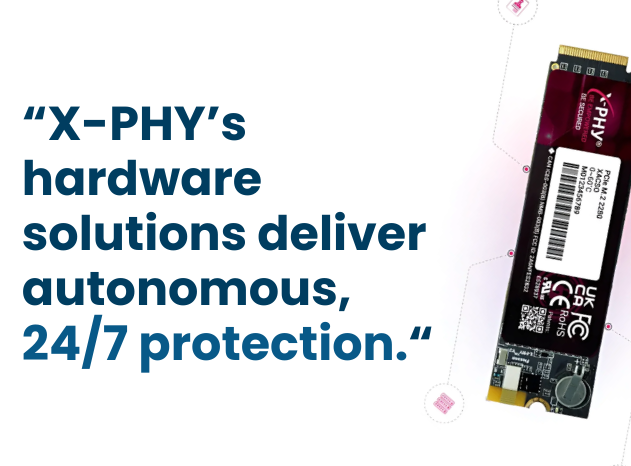
Secure SSD — Cybersecurity leader Flexxon has introduced its Secure SSD, a hardware-based defense system built to counter ransomware, zero-day exploits, and physical intrusions.
Aligned with zero-trust principles, the solution combines the Cybersecure SSD with the Guard PC Application, creating a proactive security layer that protects data even when traditional software defenses fail.
Table of Contents
Why Deepfake Detection Matters
Software defenses can fail when attackers target firmware or physically tamper with devices.
Flexxon’s Secure SSD adds a hardware-level shield that detects attacks in real time, protects data in high-risk environments, and ensures integrity and compliance — giving organizations true peace of mind.
Secure SSD: Meeting the Ransomware Challenge
Flexxon addresses this gap by embedding protection directly into the hardware, ensuring critical data remains secure against both known and emerging attacks.
Key Features and Capabilities
AI-embedded firmware protection
Firmware integrity / digital signatures
Offline / endpoint compatible
Hardware-Level Protection
Unlike software-only tools, SSD continuously monitors data access and system behavior in real time. It can detect anomalies, stop ransomware before it encrypts files, and block unauthorized physical access.
Real-World Benefits
Industries that handle sensitive data—such as finance, healthcare, and government—stand to benefit the most. By adopting Flexxon, organizations strengthen compliance, reduce downtime from cyber incidents, and safeguard against financial and reputational losses.
Product Demo
Watch how the Flexxon Secure SSD actively protects your data from firmware attacks, tampering, and unauthorized access. The demo highlights built-in AI monitoring, self-locking behavior when threats are detected, and the drive’s resilience even in high-risk environments. A must-see for anyone serious about storage security.
Need more Flexxon Products?
Flexxon sets a new standard for digital resilience, offering peace of mind, anytime, anywhere in an era of escalating cyber threats.
contact us at protect@acton-tech.com
- Post date: October 3, 2025
- 1218 Views
- 0 Comments
The Rise of Deepfakes: Why Organizations Need a Deepfake Detector Now

Deepfake Detection X-PHY: The Rise of Deepfakes Now
(Deepfake Detection)
Imagine receiving a video call from your CEO asking for an urgent fund transfer. The voice is accurate. The face looks real. The urgency feels authentic.
But the person on the screen isn’t actually your CEO.
This is the reality of deepfake attacks—AI-generated video and audio designed to impersonate real people with alarming accuracy. What once looked like a futuristic threat is now being used in corporate fraud, political manipulation, identity theft, and social engineering attacks.
Table of Contents
What Is a Deepfake Detection?
A deepfake detector is a cybersecurity solution designed to analyze video, audio, and visual media in real time to determine whether the content is authentic or AI-generated.
Unlike traditional security tools that detect malware or phishing links, deepfake detectors focus on verifying human identity and media authenticity.
They work by analyzing subtle indicators such as:
Facial inconsistencies
Voice pattern irregularities
Behavioral mismatches
Synthetic speech characteristics
These signals are nearly impossible for humans to detect manually but can be identified by advanced AI security systems.
The X‑PHY Deepfake Detector takes this even further by performing endpoint-level detection, verifying authenticity directly on the device before a threat can spread.
Why Deepfake Detection Is Becoming Critical
Deepfake technology is evolving faster than many security systems can keep up. Organizations across industries are already seeing its impact.
Recent cyber incidents show that attackers are using deepfakes to:
Impersonate executives in video meetings
Conduct AI-generated voice scams
Manipulate financial transactions
Bypass identity verification systems
Without detection systems in place, even trained professionals can struggle to tell the difference between real and AI-generated media.
The problem is simple:
Humans trust what they see and hear.
Deepfakes exploit that trust.
Real-World Applications of Deepfake Detection
Deepfake detection technology is not just a defensive tool—it is becoming a critical part of enterprise cybersecurity strategy.
Financial Institutions
Banks and financial organizations use deepfake detection to prevent impersonation-based fraud such as fake executive instructions, fraudulent transaction approvals, and identity verification bypass.
Corporate Security
Enterprises use deepfake detection to protect against threats like CEO impersonation, fake video conference participants, and social engineering attacks in digital communications.
Government and Public Sector
Government agencies use deepfake detection to identify AI-generated propaganda, fake public announcements, and manipulated digital evidence that could spread misinformation.
Media and Journalism
News organizations use deepfake detection to verify the authenticity of leaked footage, viral social media videos, and interviews before publishing.
Why Buy Deepfake Detection Software From Acton
To address these emerging threats, X‑PHY developed the X‑PHY Deepfake Detector, a powerful endpoint security solution designed specifically to detect AI-generated impersonation attempts.
Organizations can obtain this solution through Acton, an authorized distributor of X-PHY products.
This technology provides real-time deepfake detection directly at the device level, helping organizations identify threats before they reach critical systems.
Key Features and Capabilities
The system analyzes incoming video and audio streams instantly, identifying synthetic content before it can influence decisions or communications.
Unlike cloud-only solutions, detection occurs directly on the endpoint device, reducing latency and improving security control.
The technology analyzes:
- facial micro-expressions
- voice authenticity
- movement patterns
- biometric consistency
These indicators allow the system to identify synthetic media with high accuracy.
Organizations can integrate the solution into existing security infrastructure, authentication systems, and communication platforms.
Built for corporate environments, the detector helps secure:
- remote meetings
- executive communications
- digital identity verification
- sensitive transactions
Comparison
Without Deepfake Detection:
Higher risk of executive impersonation fraud and fake instructions.
Vulnerable to manipulated financial transactions and identity fraud.
Fake media can damage brand reputation and public trust.
Misinformation can spread through internal communication channels.
Weak defense against sophisticated AI-generated attacks.
With X-PHY Deepfake Detection
Early detection of AI-generated impersonation attempts.
Protection against social engineering and identity fraud.
Safeguards brand reputation from fake media and misinformation.
Improved trust and verification in digital communications.
Stronger cybersecurity posture for executive and organizational communications.
Why Buy Deepfake Detector Software From Acton
Authorized distributor for X-Phy
As an authorized distributor of X-PHY products, Acton provides organizations with access to cutting-edge cybersecurity solutions designed to address today’s evolving digital threats.
By working with Acton, organizations benefit from genuine X-PHY technologies, professional consultation for deployment, enterprise-ready cybersecurity solutions, and reliable local expertise and support—ensuring not only access to the technology, but also the guidance needed for effective implementation.
The Future of Digital Trust
Solutions like the X‑PHY Deepfake Detector help organizations stay ahead of these threats by detecting AI-generated impersonation attempts before they cause real damage.
Because in the age of artificial intelligence, trust must be verified—not assumed.
Contact protect@acton-tech.com
- Post date: October 3, 2025
- 4660 Views
- 0 Comments
AI Embedded Hardware: Strengthen Cybersecurity With AI-Powered Hardware

AI Embedded Hardware: A New Layer of Security for Modern Data Storage
(AI Embedded Hardware)
Most people think of SSDs as simple storage devices used to save files, applications, and operating systems. But as cyberattacks grow more advanced, traditional storage devices are no longer just about speed or capacity.
Today, organizations need storage that can actively protect the data inside it.
Table of Contents
What Is AI Embedded Hardware?
AI embedded hardware refers to technology that integrates artificial intelligence directly into a physical device. Instead of relying only on external software, the hardware itself can analyze system behavior and identify suspicious activity.
For storage devices, this means the SSD is capable of monitoring how data is accessed and detecting abnormal patterns that may indicate a cyber threat.
This approach offers several advantages:
Continuous monitoring of storage activity
Faster detection of suspicious behavior
Hardware-level protection against attacks
Reduced reliance on software-only defenses
Because the security operates at the hardware level, it adds another layer of defense even if software protections are bypassed.
AI-Embedded Secure SSD: A Quick Overview
The AI-embedded secure SSD from Flexxon introduces intelligence directly into the storage layer, helping organizations strengthen data protection without adding complex infrastructure.
Unlike standard drives that only store and retrieve data, this type of storage can monitor system behavior and detect potential threats in real time. The technology was introduced as one of the first SSD solutions to combine data storage with embedded AI cybersecurity capabilities.
Where AI Embedded Storage Is Used
AI-powered secure storage is particularly valuable in environments where data integrity and confidentiality are critical.
Enterprise IT infrastructure
Organizations managing large volumes of sensitive data require stronger protection against ransomware and data theft.
Government and defense systems
Secure storage helps protect classified information and prevent unauthorized access.
Financial institutions
Banks and financial services rely on secure data storage to safeguard transaction records and customer information.
Edge computing and industrial systems
Devices operating outside traditional data centers require built-in protection to secure distributed data environments.
Accessing Flexxon AI Embedded Hardware Through Acton
Authorized distributor for Flexxon
Organizations looking to adopt AI embedded hardware for data protection can obtain these solutions through Acton, an authorized distributor of Flexxon products.
By combining advanced storage technology with AI-driven security capabilities, businesses can strengthen their infrastructure and better protect critical data assets.
Towards Intelligent Hardware Security
As cyber threats continue to evolve, security strategies must move beyond traditional software defenses.
AI embedded hardware represents an important step forward—where devices themselves can contribute to protecting sensitive data.
Solutions like AI-embedded secure SSDs show how storage technology is evolving from passive infrastructure into an active layer of cybersecurity protection.
Contact protect@acton-tech.com
- Post date: October 3, 2025
- 2238 Views
- 0 Comments
Port Security Made Simple: Protecting What Matters Most
Port security plays a critical role in safeguarding sensitive information by preventing unauthorized access through physical ports on devices. Neglecting this aspect can leave you vulnerable to data breaches, hardware tampering, and cyber threats.
Table of Contents
Security Made Possible with Smartkeeper Port Locks
While digital threats such as malware and cyber-attacks are commonly addressed through firewalls and antivirus programs, physical security remains an equally vital component of comprehensive protection.
The Power of Physical Barriers
Smartkeeper port locks offer an innovative approach to securing your hardware, creating an essential line of defense against unauthorized access to your devices.
Physical security measures like port locks are critical because they help prevent direct tampering and unauthorized use of your hardware. Open and unsecured ports on computers, servers, and other devices serve as gateways that can be exploited to gain access to sensitive information.
The Simplicity and Effectiveness of Smartkeeper Port Locks
Smartkeeper port locks simplify physical security by providing an easy-to-use solution to secure device ports. These locks are designed to be user-friendly, allowing for quick installation and removal while maintaining high security standards.
With their vibrant color-coding system, they enable IT teams to easily identify and manage locked ports, streamlining the process of maintaining hardware security.
The Importance of Physical Security Alongside Software Security
While software security measures such as firewalls, encryption, and antivirus programs protect data against virtual threats, physical security safeguards the hardware that houses this data. A breach in either domain can expose sensitive information, disrupt operations, and incur substantial financial losses.
Bridging the Security Gap
Why does physical security matter as much as software security? Consider a scenario where a disgruntled employee could easily disconnect a USB drive and walk away with gigabytes of sensitive data. Without appropriate physical security measures, such as port locks, the efficacy of cybersecurity solutions is severely undermined.
Integrating SmartKeeper Port Locks for Comprehensive Protection
SmartKeeper port locks provide a seamless solution to this security dilemma. By physically securing ports, these devices prevent unauthorized access and usage.
They are designed to be simple yet effective, allowing organizations to safeguard their hardware without impeding operational efficiency. With SmartKeeper devices, you can effectively bolster your data protection strategy by ensuring that all physical entry points are as secure as their digital counterparts.
Top Risks of Leaving Ports Unsecured
The unsecured ports on your devices are gateways for potential data breaches and unauthorized access. In a world increasingly reliant on digital information, any hole in your security can be exploited by cybercriminals. These bad actors might gain access to confidential data, which could lead to severe financial loss, reputational damage, or even legal repercussions.
Malware and Ransomware Infections
Unsecured ports can allow malware and ransomware to enter through infected USB drives or external devices. Once inside, they can encrypt data, lock systems, or steal information. Physical port security prevents these risks by controlling device access and blocking infection sources.
Insider Threats and Human Error
Insider threats, whether accidental or intentional, pose serious risks to security. Employees may connect infected or unauthorized devices, or misuse open ports to steal or damage data. SmartKeeper port locks reduce these risks by restricting access and enforcing security policies.
Real-World Use Cases: Implementing SmartKeeper Port Locks for Enhanced Security
Implementing SmartKeeper Port Locks can significantly enhance security by restricting unauthorized access to critical systems. For instance, in computer labs, port locks ensure that only authorized devices can connect to the network, preventing data breaches and protecting intellectual property.
Safeguarding Healthcare Facilities
Ports serve as entry points not just for data, but also for malicious software. Malware and ransomware can be introduced to a network through unsecured ports via infected USB drives or other external devices. Once inside, these malicious programs can encrypt sensitive data, lock systems, or exfiltrate information to unauthorized parties.
The consequences of such attacks can be devastating, often resulting in operational downtime and costly recovery processes. Implementing physical port security helps in thwarting these threats by controlling what can physically connect to your devices, effectively blocking potential infection vectors.
Enhancing Financial Institutions' Security
Financial institutions are entrusted with safeguarding client data and financial transactions, making security a top priority. Port security is crucial in environments where sensitive financial data could be at risk.
SmartKeeper Port Locks help prevent unauthorized devices from accessing critical systems in banks and financial services firms. By restricting physical access to network ports, these locks protect against potential data breaches and ensure compliance with financial regulations.
Need more Smartkeeper port locks?
Secure every port with confidence—Acton offers the complete range of SmartKeeper port locks, from USB to RJ45 and HDMI. No matter your network needs, we have the right solution to keep your devices safe and your data protected. Get the full SmartKeeper lineup today!
contact us at protect@acton-tech.com
- Post date: August 18, 2025
- 1404 Views
- 0 Comments
Protecting Your Data: USB Data Blocker Against Juice Jacking
USB Data Blocker — According to the FBI and TSA, public USB charging stations—especially in airports—can be compromised by hackers using a method called juice jacking, where they secretly steal data or install malware while you charge your device (Fox News, 2023).
These compromised ports, often found in airports, malls, and hotels, pose serious risks like identity theft and unauthorized access. To stay safe, experts recommend using a smart data blocker to prevent unwanted data transfers (Kumar, 2020).
Table of Contents
Understanding Juice Jacking: A Growing Threat to Your Data
Juice jacking is a cyber-attack that leverages public use of USB charging stations to steal data or install malware on unsuspecting devices. This attack exploits the dual functionality of USB ports, which can transfer both power and data.
When you plug your device into a compromised charging station, malicious code can be transferred to your device without your consent or knowledge. This code can then execute a variety of harmful actions.
Goals of Juice Jacking Attacks
The primary objective of a juice jacking attack are to install malware and to copy sensitive data.
The malware can serve multiple purposes, such as tracking your keystrokes, accessing your private files, or even taking over your device entirely. Meanwhile, the data copied might include personal photos, messages, or financial information, all of which can be exploited for identity theft or sold on the dark web.
According to Statista, mobile phone users are estimated to be 44 million in 2021 to 90 million by 2025. As dependency on smartphones grows, public charging stations have become prime targets for hackers. Criminals exploit these ports through juice jacking—stealing data or installing malware via compromised USB connections.
Despite this dependence, 54.6% of people don’t realize public charging stations can be hacked. Criminals use these ports to steal passwords (42.3% knew this risk) or even lock devices permanently. This blind spot leaves millions vulnerable during routine charging.
The Role of USB Data Blocker
To safeguard yourself against this present threat, using a juice jack blocker or also known as a USB Data Blocker is highly recommended. These devices act as a barrier to your device and the charging station, allowing only power to pass through while blocking any data exchange.
By using a USB data blocker, you effectively protect your device against the digital skimmers lurking in public spaces, ensuring that you can charge your devices with peace of mind. As the battle for data security increases, such protective measures are essential for anyone.
Securing Your Devices with Smartkeeper USB Data Blocker
The Power of Physical Barriers
These port locks serve as physical blockers for unused USB ports on your devices, providing a tangible barrier against unwanted access. By securing these ports, you ensure that no unauthorized connections can access. This step can be a crucial layer in your overall cybersecurity strategy, offering peace of mind.
Smartkeeper USB Data Blocker
The Smartkeeper Data Blocker acts as an additional layer of defense. This blocker specifically addresses threats such as juice jacking. By only allowing power to flow and blocking data transfer, the data blocker ensures that your device is safe even in public charging scenarios.
- Post date: July 5, 2025
- 4248 Views
- 0 Comments
SmartKeeper Distributor: Leading the Future of Data Security Solutions
Smartkeeper Distributor — Protect sensitive data with SmartKeeper’s reliable hardware security solutions. As a leader in the industry, SmartKeeper offers a wide range of products designed to block unauthorized access and safeguard your organization’s information—easily and effectively.
Table of Contents
What SmartKeeper Offers: Comprehensive Security Solutions
- Hardware Protection for IT Infrastructure
- First line of Defense Against Data Breaches
- Port Blockers: A key security structure
Understanding SmartKeeper: Innovating Hardware Data Security
The Essence of Physical Security
Cybersecurity often focuses on software solutions, SmartKeeper offers a refreshing perspective by emphasizing hardware data security. Unlike traditional methods that rely on software or cloud-based defenses, SmartKeeper devices are uniquely physical in nature.
Your Port Security, Our Priority
Why Choose SmartKeeper for Your Data Protection Needs?
Advanced Physical Cybersecurity Solutions
SmartKeeper distinguishes itself by offering physical cybersecurity solutions that are designed to provide an effective defense against cyber intrusion. Unlike conventional software-based security measures, SmartKeeper’s products focus on securing the physical endpoints.
Contact protect@acton-tech.com
When it comes to safeguarding your data center hardware, Acton stands out as your Smartkeeper distributor. By choosing Acton, you ensure that every aspect of your data center’s physical security is covered with innovative solutions. Acton’s dedication to excellence means you gain access to top-tier customer support and expertise.
Secure your data center hardware today! For inquiries or to discuss your security needs, contact us at protect@acton-tech.com.
- Post date: June 30, 2025
- 1138 Views
- 0 Comments
Secure Your Data Center Hardware with SmartKeeper Innovations
Data Center Hardware — Imagine you, a steward of critical infrastructure, must fortify your defenses with cutting-edge solutions. SmartKeeper Innovations offers a comprehensive suite of data security products designed to protect your hardware from unauthorized access and physical tampering. By integrating SmartKeeper’s meticulously engineered solutions, you ensure the integrity and resilience of your data center operations.
Explore how these products can improve your security strategy, providing peace of mind and a robust defense against the ever-present threats in today’s digital landscape.
Table of Contents
Understanding Data Center Hardware: The Critical Need for Data Security
The Imperative of Safeguarding Hardware
Data center hardware serves as the backbone of an organization’s IT infrastructure. Its security is paramount to prevent hardware-based attacks that can cause extensive damage and data breaches. When discussing data center security, it’s crucial to highlight the protection of physical components to ensure that malicious actors cannot compromise the integrity of systems.
Physical security measures act as the first line of defense, deterring unauthorized access and ensuring that the hardware remains untampered. This involves deploying technologies like SmartKeeper, which secures ports and connections vulnerable to physical hacking attempts. By preventing unauthorized physical interactions, these safeguards maintain the integrity of data center operations.
The Role of Physical Security in Data Centers
Physical security extends beyond locking ports and securing perimeters. It involves a holistic approach to protect data center hardware from every attack. These measures collectively prevent unauthorized physical access, ensuring that your data center hardware remains uncompromised.
Protecting Data Center Hardware Ensures
Integrity
Confidentiality
Safe server operations
Introducing Smartkeeper
Securing Data Centers with Smart Keeper
SmartKeeper products have become pivotal in ensuring the security and efficiency of data center hardware. With your facility housing vast amounts of sensitive information, these innovative tools act as a crucial first line of defense against potential data breaches and system infections.
Uninterrupted Connectivity
SmartKeeper products excel in various settings, including data centers, offices, and networking environments. Their primary function is to ensure uninterrupted connectivity, which is essential for maintaining operational efficiency.
Preventing Unauthorized Access
A common threat to data center hardware is unauthorized access to USB ports, which can lead to significant security vulnerabilities. SmartKeeper addresses this concern by offering a range of locking devices specifically designed to safeguard these entry points.
By integrating SmartKeeper products into your data center, you can enhance security measures while ensuring optimal performance. These solutions offer a reliable way to protect your technology and information, keeping your operations running smoothly and securely.
How We Enhance Security for Data Center Hardware
When it comes to safeguarding your data center hardware, SmartKeeper port locks stands as a formidable ally. This innovative device provides unmatched security measures, ensuring that your devices and data remain secure from unauthorized access and malicious threats.
By physically blocking ports, the Port Lock prevents unauthorized devices from connecting, thereby mitigating risks associated with data breaches.
It’s an ideal solution for facilities keen on maintaining the integrity and confidentiality of their information.
The SmartKeeper port locks not only acts as a deterrent but also reinforces your organization’s commitment to data security.
Best Practices for Implementing SmartKeeper Solutions
Understanding SmartKeeper Solutions
SmartKeeper products have revolutionized the way data center hardware is secured by offering a physical security system that operates independently of software or electricity.
These solutions are designed to be robust and easy to implement, affording data centers an additional layer of security against potential breaches. By focusing on physical access control, SmartKeeper ensures that sensitive areas of the hardware, such as USB ports, LAN ports, or RJ45 ports, are effectively monitored and protected from unauthorized access.
Preventing Unauthorized Connections
Implementing SmartKeeper solutions can significantly reduce the risk of unauthorized connections. By physically securing unused ports, these devices ensure that only authorized personnel can access critical components of your data center hardware.
This proactive measure not only protects the hardware but also enhances the overall security posture of the data center. SmartKeeper’s innovative approach ensures that data remains secure without the need for additional software interventions, making it an ideal choice for data centers seeking to bolster their security measures.
Call to action: Contact protect@acton-tech.com
When it comes to safeguarding your data center hardware, Acton stands out as your go-to provider for SmartKeeper products. By choosing Acton, you ensure that every aspect of your data center’s physical security is covered with innovative solutions. Acton’s dedication to excellence means you gain access to top-tier customer support and expertise.
Secure your data center hardware today! For inquiries or to discuss your security needs, contact us at protect@acton-tech.com.
- Post date: June 18, 2025
- 1200 Views
- 0 Comments
Healthcare Cybersecurity Explained: How Hospitals Can Stay Protected
Healthcare Cybersecurity — Scared of data leakage? As a healthcare professional, understanding the intricacies of cybersecurity is crucial to protecting both hospital operations and patient privacy. Explore the strategies that fortify your organization against cyber threats, including the innovative use of Smartkeeper port locks, which serve as a formidable barrier to unauthorized access.
Table of Contents
Understanding Healthcare Cyber security
The Essence of Healthcare Cyber security
With the increasing volume of data being digitized, healthcare cybersecurity has become crucial for protecting such data from cyberattacks. This involves implementing robust data security protocols to ensure that patient records, medical histories, and other sensitive information remain confidential and out of the hands of cyber criminals.
Importance of Robust Cybersecurity Measures
Implementing comprehensive cybersecurity measures is essential not only for protecting sensitive data but also for maintaining trust.
Patients entrust healthcare providers with their most personal information, and any breach can significantly undermine this trust. Moreover, effective cybersecurity protocols help healthcare institutions comply with legal and regulatory frameworks.
By prioritizing cybersecurity, healthcare facilities can protect their reputation and ensure the safety and privacy of their patients’ information, thus fostering a trustworthy healthcare environment.
The Importance of Cybersecurity in Hospitals and Patient Care
- Safeguarding Patient Safety and Privacy
- Ensuring Compliance and Maintaining Trust
- Preventing Service Disruption and Treatment Delays
- Avoid ransomware attacks
Common Threats: How Data Breaches and Data Leaks Occur in Healthcare
The Scale of Healthcare Data Breaches
In 2023, a staggering 725 data breaches in the healthcare sector exposed over 133 million records, underlining the immense scale and risk associated with these incidents.
This follows a previous trend from 2019, where 505 breaches resulted in the exposure of 41.2 million records.These numbers highlight not only the increasing frequency of such breaches but also the urgent need for enhanced cybersecurity measures in the healthcare industry.
Causes of Healthcare Data Breaches
Healthcare data breaches are often the result of various security incidents, many of which are preventable with the right protocols.
A significant threat comes from credential-stealing malware, which targets login details to gain unauthorized access to sensitive systems and gain access control. Once hackers obtain these credentials, they can navigate through systems, extract patients’ personal information, and even disrupt healthcare operations.
The Impact on Hospitals and Patients
Data breaches have far-reaching consequences, affecting both hospitals and patients. For healthcare organizations’ providers, they can lead to financial losses, reputational damage, and regulatory penalties.
Patients, on the other hand, face the risk of identity theft and the loss of privacy related to their medical records. This underscores the vital need for robust cybersecurity frameworks to safeguard critical healthcare data.
Implementing Effective Strategies to Prevent Data Breaches
Understanding the Role of Smartkeeper Port Locks
Regular updates and smartkeeper port locks, these small yet powerful devices are designed to prevent unauthorized access to hospital networks by securing the physical ports on computers and servers.
Smartkeeper port locks are compact and easy to use, requiring minimal technical expertise to install. Their design ensures that only authorized personnel can unlock them, thereby reducing the risk of internal and external threats. The locks are durable and cost-effective, making them an attractive option for healthcare institutions seeking robust cybersecurity measures without the burden of excessive costs.
Benefits of Using Smartkeeper Port Locks
The benefits of Smartkeeper port locks extend beyond their ease of use and affordability. These tools offer ready-to-go data protection, instantly enhancing a hospital’s cybersecurity posture. These locks physically block unused ports to prevent data leaks and breaches caused by unauthorized devices.
Furthermore, implementing such tangible cybersecurity measures can boost confidence among patients and staff, knowing that their sensitive information is better protected. Smartkeeper port locks serve as a practical component of a comprehensive cybersecurity strategy, working in tandem with software solutions to safeguard against various cyber threats.
Call to action: Contact Protect@Acton-Tech.com
As you navigate the complexities of safeguarding sensitive patient data against cyber attacks, it’s crucial to partner with experts who understand the nuances of healthcare security.
- Post date: June 9, 2025
- 1221 Views
- 0 Comments
Open Port Risks: Why Closed Devices Aren’t Always Safe
Open Port Risks: Why Closed Devices Aren't Always Safe
Open Port Risks — Open ports, often overlooked, present a significant vulnerability that can be exploited by malicious actors, undermining the security of your digital infrastructure. Despite the sophistication of modern security systems, the oversight of unsecured ports can lead to devastating breaches. Fortunately, solutions like Smartkeeper offer a comprehensive range of port locks designed to safeguard every type of port.
Table of Contents
Understanding Open Port Risks: The Hidden Threats
The Importance of Vigilance
Regularly scanning your network for open ports and evaluating the necessity of each can mitigate potential threats. Employing advanced security solutions like firewalls and intrusion detection systems can also offer significant protection. Moreover, utilizing products such as Smartkeeper’s port locks can physically block unused ports, adding an extra layer of security
The Basics of Open Ports
An open port is like an inviting entrance, allowing external devices to communicate with your network. These ports are essential for various services, such as web servers or email clients, enabling data exchange over the internet.
However, the same portals that facilitate communication can also become gateways for potential security threats.
The Hidden Dangers
Open port risks manifest when these channels are not properly secured. Cybercriminals often scan networks for open ports to exploit vulnerabilities, gaining unauthorized access to systems.
This access can lead to data breaches, malware infections, or even full-scale network compromise. The most common victims are those who assume that a closed device implies complete security, overlooking the implications of exposed ports.
How Hackers Exploit Open Ports on Closed Devices
Understanding Open Port Risks
Open ports act as digital doorways, enabling data transfer and communication between devices and networks.
While essential for many online functions, they can also become gateways for unauthorized access if not properly managed. Hackers often probe these ports to identify which ones are open, allowing them to exploit vulnerabilities and gain access to sensitive data.
Techniques Used by Hackers
Think like a hacker: One common technique employed by hackers is port scanning, which involves systematically sending data packets to various ports to identify those that are open and susceptible to attack.
Once an open port is detected, attackers may use it to introduce malware or execute commands, potentially gaining control over the device.
Mitigating Open Port Risks
To protect against these threats, it is crucial to regularly audit and monitor your network for open ports. Employing firewalls, disabling unnecessary services, and using security solutions like Smartkeeper’s port locks can significantly reduce the risk of unauthorized access.
By closing or securing open ports, you fortify your devices against potential breaches.
The Role of Open Ports in Cybersecurity Breaches
- Understanding Open Ports
- Exploitation Through Open Ports
- Mitigating Open Port Risks
Smartkeeper's Port Locks: Protecting Your Devices
Understanding the Role of Port Locks Against Open Port Risks
Despite the common belief that closed devices are impervious to threats, open ports can inadvertently expose your systems to potential risks. This is where Smartkeeper’s port locks come into play, offering a robust solution to fortify your device security.
Port locks act as physical barriers that effectively block unauthorized access to various types of ports on your devices. These tiny, yet powerful, security tools prevent malicious entities from exploiting open ports, which are often used as gateways for cyberattacks.
Enhancing Device Security with Smartkeeper
The implementation of Smartkeeper’s port locks exemplifies a proactive stance against open port risks. Their strategic design ensures that your systems maintain optimal security without compromising functionality.
By integrating these locks into your cybersecurity strategy, you reinforce your defenses against emerging threats, providing peace of mind in an increasingly interconnected digital landscape.
Benefits of Using Smartkeeper's Port Locks
Customizable Security
Ease of Use
Cost-Effective Protection
How to Secure Your Devices Against Open Port Risks
Step 1: Implement Strong Security Protocols
Step 2: Utilizing Port Locking Solutions
Step 3: Conduct Regular Security Audits
We secure solutions – Protect@acton-tech.com
Protect your peace of mind and secure your devices against potential cyber threats today.
- Post date: June 4, 2025
- 2234 Views
- 0 Comments
USB-C Port Blocker: Safeguarding Your Connection Points
USB-C Port Blocker — Safeguarding your devices requires more than just passwords and encryption. You are likely aware of the vulnerabilities that lurk within your hardware, particularly the USB Type C ports that serve as gateways for data transfers and power connections. Enter the Smartkeeper USB Type C port blockers, a practical solution designed to fortify these critical connection points. By employing these blockers, you ensure an additional layer of defense against unauthorized access and potential data breaches, reinforcing the integrity of your devices in an increasingly interconnected world.
Table of Contents
What Are USB-C Port Blocker?
USB Type C port blockers are small yet indispensable devices designed to protect and maintain the integrity of your connection points. In an era where cyber threats, physical damage, and unauthorized access are prevalent, these blockers serve as a first line of defense for your devices. By physically covering the USB Type C ports, they prevent unwanted physical connections, which could lead to data breaches or port damage.
How Do They Work?
Simple yet effective, USB Type C port blockers are easy to install and remove, often requiring only a key or a specific tool for unlocking.
Understanding USB-C Port Blocker
Why Consider Using Them?
The significance of USB Type C port blockers extends beyond simple physical protection. They are particularly valuable in environments that prioritize data security and equipment longevity—such as corporate offices, educational institutions, and public spaces. Port blockers deter unauthorized users from connecting potentially harmful devices that could compromise network security. Additionally, they protect the port from dust and debris, which can impede functionality over time.
Why Use a USB-C Port Blocker?
Protecting Your Type C Port Devices
Enhancing Durability
Ensuring Data Integrity
How to Install and Remove USB-C Port Blocker
Installation of USB-C Port Blocker
The installation of USB Type C port blockers is a straightforward process, designed to secure your connection points without hassle. To begin, ensure that you have the appropriate port blocker for your device. These blockers are usually small, durable, and easy to handle.
Removal of USB-C Port Blocker
Removing the USB Type C port blocker requires a bit more attention to ensure there is no damage to your device or the blocker itself.
Use the correct key: Port blockers come with a specific key designed for removal. Insert this tool into the corresponding slot of the blocker.
Comparing USB-C Port Blocker: Features and Benefits
Design and Compatibility
When evaluating USB-C port blockers, the first consideration should be their design and compatibility. In today’s diverse tech landscape, it’s crucial to ensure that the port blockers you choose seamlessly integrate with a wide array of devices.
Durability and Material Quality
Another critical factor is the durability and quality of materials used in the port blockers. Opt for products made from robust materials that can withstand wear and tear. High-grade plastic or metal blockers provide long-term protection against physical damage and dust accumulation, which are common threats to connectivity ports.
Ease of Use and Removal
Port blockers should also be user-friendly, with simple installation and removal processes. Check for features like an ergonomic design that allows for easy insertion and extraction without the need for specialized tools.
Secure Your Data – Protect@acton-tech.com
- Post date: May 30, 2025
- 1777 Views
- 0 Comments