

Mini Display Port Lock | CSK-MD04
SmartKeeper Mini Display Port Lock protects standard DisplayPort connections from unauthorized removal, tampering, and accidental unplugging. Its compact Professional Mini design provides hardware-level physical security without software, external power, or complex configuration.
Width (mm) : 7.4
Height (mm) : 4.4
Length (mm) : 5
Weight (g) : 0.1
ARE YOU FROM THE PHILIPPINES?
Click Here to Shopee for Easier Purchase & Faster Deliveries.
FEATURES OF SMARTKEEPER MINI DISPLAY PORT LOCK
- Secures DisplayPort cables against unauthorized removal.
- Prevents accidental disconnections, tampering, and display interruptions.
- Provides hardware-level protection with a compact, tamper-resistant design.
- Installs easily with a tool-free plug-and-lock setup.
- Supports monitors, professional AV systems, and shared environments.
- Delivers reliable DisplayPort protection with the SmartKeeper Mini Display Port Lock CSK-MD04.

Secure your network and workstations with SmartKeeper port blockers
Unlock Mini Display Port Lock: Lock Key Mini | U04
Explore More: SmartKeeper Pro Series
MINI DISPLAY PORT LOCK | ESSENTIAL SERIES VS PROFESSIONAL SERIES
SMARTKEEPER ESSENTIAL provides practical, budget-friendly protection for everyday security needs. Its standard key system and color-coded port locks make products easy to identify, organize, and manage.
The Essential Series is available in Black (BK), Dark Blue (DB), Brown (BN), Orange (OR), Pink (PK), Purple (PL), and Yellow (YL).
SMARTKEEPER PROFESSIONAL is designed for businesses and organizations that require advanced physical security. It supports critical environments, including large corporations and military settings, where stronger access control and managed deployment are essential.
The Professional Series is available in Red (RD)


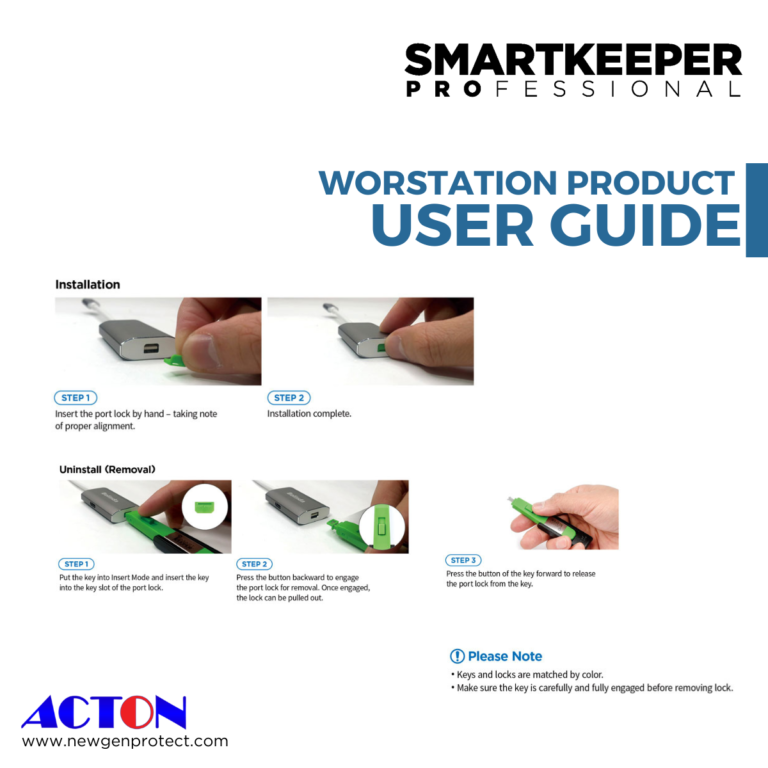
How To Use Mini Display Port Lock?
For proper installation, start by manually inserting the port lock, making sure it aligns correctly.
When it comes to uninstallation, switch the key to Insert Mode and insert it into the key slot of the port lock. Push the button backward to activate the lock for removal, allowing you to pull it out.
To complete the process, push the key’s button forward to detach the port lock.
Remember, it’s crucial to ensure that the key is fully engaged before removing the lock to maintain optimal security.
Frequently Asked Questions
SmartKeeper Products are available through Acton SmartKeeper across
Singapore, Philippines, Thailand, Malaysia, and Vietnam.
How does the Mini Display Port Lock work?
The SmartKeeper Mini Display Port Lock CSK-MD04 fits into a standard DisplayPort interface and physically blocks unauthorized cable removal. Its tamper-resistant design helps protect the connection from accidental unplugging and interference, supporting stable connectivity in offices, data centers, and shared environments.
Why do I need a Mini Display Port Lock?
A Mini Display Port Lock helps prevent unauthorized removal, accidental disconnection, and tampering with DisplayPort cables. The CSK-MD04 provides a practical layer of physical security for compatible monitors, professional AV systems, digital signage, and shared workstations.
Why is the Mini Display Port Lock important for cybersecurity?
The CSK-MD04 adds hardware-level protection by restricting unauthorized physical access to a standard DisplayPort connection. It supports a broader cybersecurity strategy by helping organizations secure accessible device interfaces against tampering, with no software or external power required.
Is the Mini Display Port Lock easy to install and remove?
Yes. The SmartKeeper Mini Display Port Lock CSK-MD04 uses a tool-free plug-and-lock setup for straightforward installation. Insert and secure the lock according to the supplied instructions, then use the compatible authorized lock key to release it when access is required.
Can the Mini Display Port Lock help prevent display interruptions?
Yes. By helping prevent accidental cable removal and unauthorized disconnection, the CSK-MD04 can reduce interruptions caused by an unsecured DisplayPort connection. It is well suited to environments where stable video and data transmission are important.
Are special tools required for installation?
No. The SmartKeeper Mini Display Port Lock CSK-MD04 uses a tool-free plug-and-lock setup. Simply confirm DisplayPort compatibility and follow the supplied instructions for a straightforward installation.
Enhancing Cybersecurity with Mini Display Port Lock
To ensure the safety and security of your IT equipment, it’s essential to tackle these vulnerabilities effectively:
Exposed ports can leave your devices vulnerable to malicious software attacks.
Aging routers and switches create an easy gateway for hackers to infiltrate and compromise your data.
Unauthorized access by hackers can result in the installation of harmful tools such as keyloggers, posing a significant threat to your network security.
For an added layer of protection and to fortify your IT infrastructure, consider implementing physical port locks like SmartKeeper Port Locks. Offering a straightforward, cost-efficient, and reliable solution, they help deter unauthorized access and bolster your overall security protocols.
CHECK OUR PRODUCTS MORE:
HARDWARE SECURITY

Pro series is a customized security solution tailored to your company’s IT infrastructure.
Essential Series delivers similar security solutions to safeguard personal use.

Smart Keeper Singapore
Address: 11 Woodlands Close #09-27
Woodlands 11 Singapore 737853
Phone: +(65) 6684-2013
Fax: +(65) 6684-2011
Smart Keeper Philippines
Address: G/F, Correal Property Building, #14 Lotus St. T.S. Cruz Subd, Almanza Dos, Las Piñas City 1751
Phone: (+632) 8850 6182 /83
Fax: (+632) 8850 6184
Smart Keeper Thailand
Address: 277/12-13 Soi Rongrian Khlong Lamchiak, Klong Chan, Bangkapi Bangkok Thailand 10240
Phone: +(66) 2-508-1529
Fax: +(66) 2-508-1530
Smart Keeper Malaysia
Address: 11-1, Persiaran Bayan Indah, Bayan Bay, Sungai. Nibong, 11900 Penang, Malaysia
Phone: +(60) 4-646-7818
Fax: +(60) 4-645-0818
Contact Smart Keeper
Facebook: Acton SmartKeeper
LinkedIn: Acton SmartKeeper
WhatsApp: +65 8430 2884
Email: protect@acton-tech.com
Office Hours
9:00 am – 6:00 pm
Monday to Friday